
diff options
| author | Dawid Rycerz <dawid@rycerz.xyz> | 2026-02-08 22:52:24 +0100 |
|---|---|---|
| committer | Dawid Rycerz <dawid@rycerz.xyz> | 2026-02-08 22:52:24 +0100 |
| commit | 29b7f448ec0bad2f6a80ffeda4ffcd91140317e5 (patch) | |
| tree | 45be1804ef743a3273a2fff64b8c3d47db530b3e /src | |
| parent | 57efd96a0f568491fe6138e39ab05f09727261ba (diff) | |
Co-Authored-By: Claude Opus 4.6 <noreply@anthropic.com>
Diffstat (limited to 'src')
| -rw-r--r-- | src/content/post/configure-wireguard-vpn-behind-nat.md | 100 | ||||
| -rw-r--r-- | src/content/post/debug-docker-network.md | 84 | ||||
| -rw-r--r-- | src/content/post/deploy-kubernetes-cluster-in-minutes-with-k3s.md | 116 |
3 files changed, 300 insertions, 0 deletions
diff --git a/src/content/post/configure-wireguard-vpn-behind-nat.md b/src/content/post/configure-wireguard-vpn-behind-nat.md new file mode 100644 index 0000000..3b59c71 --- /dev/null +++ b/src/content/post/configure-wireguard-vpn-behind-nat.md @@ -0,0 +1,100 @@ +--- +title: "Configure Wireguard VPN" +description: "wireguard VPN behind NAT" +publishDate: "2020-02-10" +tags: ["archived", "network", "en"] +author: "Dawid" +--- + +[Wireguard](https://www.wireguard.com/) is fast, simple (around 4k lines of code) and secure VPN. From my perspective as a user, a configuration is as simple as in SSH. + +## Installation + +Add repository and install package (for other systems go to [official docs](https://www.wireguard.com/install/)) + +```bash +add-apt-repository ppa:wireguard/wireguard +apt-get update +apt-get install -y wireguard +``` + +Ensure that you enabled forwarding in sysctl. + +```bash +echo "net.ipv4.ip_forward = 1" > /etc/sysctl.d/wg.conf +echo "net.ipv6.conf.all.forwarding = 1" >> /etc/sysctl.d/wg.conf +sysctl --system +``` + +## Configuration + +1. Create server and client keys + + ```sh + wg genkey | tee server.private.key | wg pubkey > server.public.key + wg genkey | tee client.private.key | wg pubkey > client.public.key + ``` + +2. `touch /etc/wireguard/wg0.conf` and put config for VPN interface: + + ```ini + [Interface] + Address=<server VPN ip>/24 + PrivateKey = <server private key> + ListenPort = 51820 + PostUp = iptables -t nat -A POSTROUTING -o <server NAT interface> -j MASQUERADE; ip6tables -t nat -A POSTROUTING -o <server NAT interface> -j MASQUERADE + PostDown = iptables -t nat -D POSTROUTING -o <server NAT interface> -j MASQUERADE; ip6tables -t nat -D POSTROUTING -o <server NAT interface> -j MASQUERADE + + [Peer] + PublicKey = <client public key> + AllowedIPs = <client VPN ip>/32 + ``` + + Example: + + ```ini + [Interface] + Address=192.168.101.1/24 + PrivateKey = mHjrLYUTKbrGqJViVOHfQX9dN0Sn49gJNoof68nbJHA= + ListenPort = 51820 + PostUp = iptables -t nat -A POSTROUTING -o enp0s3 -j MASQUERADE; ip6tables -t nat -A POSTROUTING -o enp0s3 -j MASQUERADE + PostDown = iptables -t nat -D POSTROUTING -o enp0s3 -j MASQUERADE; ip6tables -t nat -D POSTROUTING -o enp0s3 -j MASQUERADE + + [Peer] + PublicKey = XKT1Ctj5b+gjXc1gMtOdxNEpc9UUM2TsXaFdAyABd3w= + AllowedIPs = 192.168.101.2/32 + ``` + +3. Run VPN server with `wg-quick up` + +4. Create config for client + + ```ini + [Interface] + Address = <client VPN ip>/24 + PrivateKey = <Client Private Key> + ListenPort = 21841 + DNS = <dns ip 1>,<dns ip 2> + + [Peer] + PublicKey = <server public key> + Endpoint = <server bridge interface address>:51820 + AllowedIPs = 0.0.0.0/0 + ``` + + Example: + + ```ini + [Interface] + Address = 192.168.101.2/32 + PrivateKey = 0AQI65ehzszpXf9f2FWEABX90PX+gv5DJH3/mkZ/eW8= + ListenPort = 21841 + DNS = 1.1.1.1,1.1.0.0 + + [Peer] + PublicKey = ccDLW5zKussL3ejxMqWpx1uZMfN09bkGAirCWXZWp0s= + Endpoint = 192.168.1.5:51820 + AllowedIPs = 0.0.0.0/0 + ``` + +5. Install client software https://www.wireguard.com/install/ and paste client config diff --git a/src/content/post/debug-docker-network.md b/src/content/post/debug-docker-network.md new file mode 100644 index 0000000..7c9fc4b --- /dev/null +++ b/src/content/post/debug-docker-network.md @@ -0,0 +1,84 @@ +--- +title: "Debug Docker Network" +description: "debug docker network" +publishDate: "2020-02-11" +tags: ["archived", "network", "docker", "en"] +author: "Dawid" +--- + +What to do if docker image have installed no network utilities ("dig", "tcpdump", "nc", etc.) or even "shell"? We could use "namespaces" to enter one docker container isolated environment with another instead of trying to install those tools into running docker container. + +## Usecase + +Let's imagine following use-case: a "server" ("portainer") that is docker container without shell and a client ("busybox") which sends a http requests. Both "server" and "client" are in isolated network "backend". + +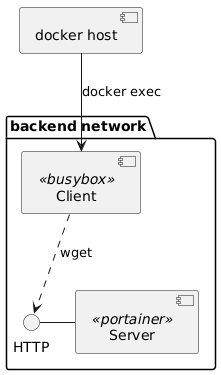 + +## Lab setup + +At first create a isolated backend network, start "portainer" image as our server: + +```sh +$ docker network create backend +$ docker run -d --net backend --name=portainer -v /var/run/docker.sock:/var/run/docker.sock portainer/portainer-ce +``` + +Next create our client container. Keep session working for later. + +```sh +$ docker run -d --rm --net backend busybox +``` + +## Capture packets: + +Now we'll try to capture packets on "portainer" container. + +In one console spawn `nicolaka/netshoot` container in "portainer" network namespace and start tcpdump. + +```sh +$ docker run -it --rm --net container:portainer nicolaka/netshoot bash +# tcpdump +``` + +On the busybox session run `wget`: + +```sh +/ # wget http://portainer:9000 +``` + +Console with "tcpdump" should show request from busybox client. + +```txt +20:37:34.779034 ARP, Request who-has 6c9561758f20 tell 9dbe9ea2dbf9.backend, length 28 +20:37:34.779044 ARP, Reply 6c9561758f20 is-at xx:xx:xx:xx:xx:xx (oui Unknown), length 28 +20:37:34.779097 IP 9dbe9ea2dbf9.backend.46548 > 6c9561758f20.9000: Flags [S], seq 4285761690, win 64240, options [mss 1460,sackOK,TS val 4087033204 ecr 0,nop,wscale 7], length 0 +20:37:34.779141 IP 6c9561758f20.9000 > 9dbe9ea2dbf9.backend.46548: Flags [S.], seq 325737431, ack 4285761691, win 65160, options [mss 1460,sackOK,TS val 505550796 ecr 4087033204,nop,wscale 7], length 0 +20:37:34.779205 IP 9dbe9ea2dbf9.backend.46548 > 6c9561758f20.9000: Flags [.], ack 1, win 502, options [nop,nop,TS val 4087033205 ecr 505550796], length 0 +20:37:34.779311 IP 9dbe9ea2dbf9.backend.46548 > 6c9561758f20.9000: Flags [P.], seq 1:78, ack 1, win 502, options [nop,nop,TS val 4087033205 ecr 505550796], length 77 +20:37:34.779327 IP 6c9561758f20.9000 > 9dbe9ea2dbf9.backend.46548: Flags [.], ack 78, win 509, options [nop,nop,TS val 505550796 ecr 4087033205], length 0 +20:37:34.780354 IP 6c9561758f20.9000 > 9dbe9ea2dbf9.backend.46548: Flags [P.], seq 1:306, ack 78, win 509, options [nop,nop,TS val 505550797 ecr 4087033205], length 305 +20:37:34.780417 IP 9dbe9ea2dbf9.backend.46548 > 6c9561758f20.9000: Flags [.], ack 306, win 501, options [nop,nop,TS val 4087033206 ecr 505550797], length 0 +20:37:34.780512 IP 6c9561758f20.9000 > 9dbe9ea2dbf9.backend.46548: Flags [.], seq 306:7546, ack 78, win 509, options [nop,nop,TS val 505550797 ecr 4087033206], length 7240 +20:37:34.780555 IP 9dbe9ea2dbf9.backend.46548 > 6c9561758f20.9000: Flags [.], ack 7546, win 479, options [nop,nop,TS val 4087033206 ecr 505550797], length 0 +20:37:34.780573 IP 6c9561758f20.9000 > 9dbe9ea2dbf9.backend.46548: Flags [.], seq 7546:14786, ack 78, win 509, options [nop,nop,TS val 505550797 ecr 4087033206], length 7240 +20:37:34.780608 IP 9dbe9ea2dbf9.backend.46548 > 6c9561758f20.9000: Flags [.], ack 14786, win 446, options [nop,nop,TS val 4087033206 ecr 505550797], length 0 +20:37:34.780631 IP 6c9561758f20.9000 > 9dbe9ea2dbf9.backend.46548: Flags [P.], seq 14786:23486, ack 78, win 509, options [nop,nop,TS val 505550797 ecr 4087033206], length 8700 +20:37:34.780665 IP 9dbe9ea2dbf9.backend.46548 > 6c9561758f20.9000: Flags [.], ack 23486, win 407, options [nop,nop,TS val 4087033206 ecr 505550797], length 0 +20:37:34.780810 IP 6c9561758f20.9000 > 9dbe9ea2dbf9.backend.46548: Flags [F.], seq 23486, ack 78, win 509, options [nop,nop,TS val 505550797 ecr 4087033206], length 0 +20:37:34.781350 IP 9dbe9ea2dbf9.backend.46548 > 6c9561758f20.9000: Flags [F.], seq 78, ack 23487, win 501, options [nop,nop,TS val 4087033207 ecr 505550797], length 0 +20:37:34.781375 IP 6c9561758f20.9000 > 9dbe9ea2dbf9.backend.46548: Flags [.], ack 79, win 509, options [nop,nop,TS val 505550798 ecr 4087033207], length 0 +20:37:39.835649 ARP, Request who-has 9dbe9ea2dbf9.backend tell 6c9561758f20, length 28 +20:37:39.835708 ARP, Reply 9dbe9ea2dbf9.backend is-at xx:xx:xx:xx:xx:xx (oui Unknown), length 28 +``` + + +## Run commands in namespace from a host + +For more powerful debugging we can run commands in container namespace from host. + +On the docker host just run to spawn "wireshark" inside portainer namespace: + +```sh +$ export CLIENT_PID=`docker inspect --format '{{ .State.Pid }}' portainer` +$ sudo nsenter -t $CLIENT_PID -n wireshark +``` diff --git a/src/content/post/deploy-kubernetes-cluster-in-minutes-with-k3s.md b/src/content/post/deploy-kubernetes-cluster-in-minutes-with-k3s.md new file mode 100644 index 0000000..2d02c4b --- /dev/null +++ b/src/content/post/deploy-kubernetes-cluster-in-minutes-with-k3s.md @@ -0,0 +1,116 @@ +--- +title: "Deploy K8s Cluster in Minutes with k3s" +description: "deploy kubernetes cluster in minutes with k3s with metallb letsencrypt nginx ingress" +publishDate: "2020-03-23" +tags: ["archived", "docker", "kubernetes", "en"] +author: "Dawid" +--- + +[K3S](https://k3s.io) is a lightweight and certified Kubernetes distribution, perfect for run development environments, CI/CD and IoT. It works very well with the ARM architecture. It's packaged to a single binary that makes deployment and setup easy. + +The default installation comes with: + +- embedded SQLite +- containerd +- flannel +- coredns +- traefik (ingress controller) +- local path provisioner +- service load balancer + +All those features are more than enough for most use-cases. Of course, installation is fully configurable, so if you want etcd, docker, Nginx ingress and so on - go to official documentation page https://rancher.com/docs/k3s/latest/en/ . + +## Default installation + +Login to machine and run: + +```bash +curl -sfL https://get.k3s.io | sh - +``` + +and that's it... +After a few seconds, you should see that the master node is ready with `k3s kubectl get node`. + +You will find *config.yaml* for kubernetes in `/etc/rancher/k3s/k3s.yaml` + +## Advanced installation with nginx-ingress, metallb and cert-manager + +1. Deploy k3s without traefik and servicelb + + ```bash + curl -sfL https://get.k3s.io | K3S_KUBECONFIG_MODE="644" INSTALL_K3S_EXEC=" --no-deploy=servicelb --no-deploy=traefik" sh -s - + ``` + +2. Get config from `/etc/rancher/k3s/k3s.yaml` and put into `~/.kube/config` on your machine + +3. [Install helm](https://helm.sh/docs/intro/install/) + + ```bash + curl https://raw.githubusercontent.com/helm/helm/master/scripts/get-helm-3 | bash + ``` + +4. Add helm repo and update + + ```bash + helm repo add stable https://kubernetes-charts.storage.googleapis.com/ + helm repo update + ``` + +5. Install [metallb](https://github.com/metallb/metallb). Range of available ip addresses for loadbalancer are set in `configInline.address-pools[0].addresses[0]`. + + ```bash + helm install --namespace=kube-system \ + --set configInline.address-pools[0].name=default \ + --set configInline.address-pools[0].protocol=layer2 \ + --set configInline.address-pools[0].addresses[0]=192.168.1.10-192.168.1.50 \ + metallb stable/metallb + ``` + +6. Install [nginx-ingress](https://github.com/kubernetes/ingress-nginx) + + ```bash + helm install --namespace=kube-system \ + --set rbac.create=true \ + nginx-ingress stable/nginx-ingress + ``` + +7. Install and configure [certmanager](https://github.com/jetstack/cert-manager) for lets-encrypt + + ```bash + kubectl apply -f https://raw.githubusercontent.com/jetstack/cert-manager/release-0.14/deploy/manifests/00-crds.yaml + + helm install --namespace=kube-system cert-manager stable/cert-manager + + cat <<EOF | kubectl apply -f - + apiVersion: cert-manager.io/v1alpha2 + kind: ClusterIssuer + metadata: + name: letsencrypt + spec: + acme: + server: https://acme-v02.api.letsencrypt.org/directory + email: ACME_EMAIL + privateKeySecretRef: + name: letsencrypt + solvers: + - dns01: + cloudflare: + email: CLOUDFLARE_EMAIL + apiKeySecretRef: + name: cloudflare-apikey-secret + key: CLOUDFLARE_APIKEY + selector: + dnsNames: + - 'DOMAIN_NAME' + EOF + ``` + + Where: + - **ACME_EMAIL** - some email in yor domain (will be used to limit number of requests to acme) + - **CLOUDFLARE_EMAIL** - email of your cloudflare account + - **CLOUDFLARE_APIKEY** - api key to your cloudflare account + - **DOMAIN_NAME** - domain that will be used in lets-encrypt certs (eg.: `*.rycerz.co`) + +## Important disclaimer + +Don't deploy everything in kube-system if it's not test/development cluster. Be safe. |